Like most of the rest of the country, it has been hot here. But I like hot, so it has been great. I love warm weather. Like yesterday - it was upper 90's when I went for a bike ride. I use the mobile app: MapMyRide on my iPhone to log my 'workout'.
Here is the route I took from our campground near the Naval Air Station (NAS) Oceana. I rode down to Virginia Beach and along the boardwalk. I love Virginia Beach!
It has one of the best beaches any where. Even in the middle of the week it was busy. From 1st Street to 40th Street, it seems like there was a lot going on and a lot of folks on the beach.
For as long as the eye could see, there were beach chairs and umbrellas and people enjoying the great morning weather.
Our days are busy and I thought I'd give a recap for those of you that wonder, "What do those guys do with their time?" Here is a rundown on my day:
I got up the usual time: about 5:15 AM. I do some reading and mulling over things during my 'quiet time'. Early morning is the best part of the day for me - with a good cup of coffee, some morning solitude and a bit of a clear head, I like to think about things and plan my day.
Pam gets up a little after 7:00 AM and most days Kelly gives me a quick call on the way to work. So we can check in and see how she's doing. With the wedding a little over two weeks, things are moving right along. She is a planner and a detail person, so it pretty much under control at this point.
The last week of the month, I begin getting ready for my online work by sending my accounts an email and giving them a 'heads up' that the Monthly Report is coming due. I create folders, download report templates and basically get set up for about 40 hours of online on the 1st.
I also spent time contacting the Medical Group, our two doctors, and the lab that all have sent medical bills for two office visits and some lab blood work done six weeks ago. Our mail service is in Sioux Falls, SD and we only get delivery of our mail every four weeks. So bill payment for our doctors visits lag a bit. Other items on our Visa, MasterCard, AT&T phone bill, Verizon mifi -- I pay online so we keep up on it with no problem.
After that, it was time for a bike ride. While Pam was doing some wash, I went for the bike ride down to Virginia Beach. By the time I got back it was lunch time. I drank a couple of Gatorades and ate lunch. Next it was time to get a haircut so I spent about 30 minutes getting out the clippers and giving my self a buzz. Then I took a shower.
In the after noon, I answered some emails and had an issue with my computer access. I need to make some updates on my work paperwork and went over to the Rec Center at the Navy Annex to use their computer. I was partially successful and will need to work it some more.
By that time, it was almost time to head over to Kelly's for dinner with her. Pam took some food and we actually went over to Jon's place. She is moving some things from her place to his before the wedding. He is out of town for a few days. While Pam fixed dinner, Kelly and I fiddled with their bikes, went down to the beach to see a house one of their friend just bought.
Then we had dinner together and hung out a little while before returning to the Roadrunner. I did some reading while Pam watched a baseball game. I fell asleep for a few minutes and decided it was time to hit the hay sometime after 10:30 PM.
So - there is a rundown on a 'typical' day in the life of a full-time RVer. I say "typical" because I am not sure there is any such thing… We are here for another month or so and expect to be here at the same campground, so that part will be the same. The rest of our time here promises to be more exciting and eventful as we get ready for the wedding in a couple of weeks.
That is all for now - Thanks for joining us on the Roadrunner Chronicles! Until next time...
Showing posts with label iPhone. Show all posts
Friday, July 27, 2012
Saturday, November 5, 2011
How To Lose 25 lbs…
I have wanted to do this post for some time. This is not another story in a long line of diets or drink formulas or sales gimmicks.
The real truth of the matter is that I lost 25 lbs with my iPhone. Yep - it even does that.
More specifically, I have an app that counts calories. I am amazed that the secret to the success (for me anyway) is counting calories. I have heard about counting calories for a long long time but never done it.
Back about 10 years ago Pam and I found some success with the Adkins diet. I think I lost 17 lbs then. But it was very stringent and not without controversy. And I love some carbs now and then.
Then in the summer we went to see our good friends Steve and Theressa in Sioux Falls. They have made dramatic changes in their weight, losing a combed 100 lbs. They look great! And are going for more. When I asked how them did it ~ she indicated she tracked the food she ate on an iPhone app.
The app is from LoseIt.com The online account synchs with your iPhone. I mostly use my iPhone.
It is pretty basic. I just enter what I eat for all my meals and snacks. And I get more calories if I exercise.
Here is what it looks like on the iPhone app:
To begin with I register my age, height and weight and my target weight. It asks how aggressive I want to be in achieved my target weight. I figured 1 lb a week would be good.
I went from over a little over 180 to 165 in nine weeks.
All the literature I have read says my ideal weight is 155 so I decided to pursue that and got there in another couple of weeks.
It has changed my thinking about weight loss. I can eat anything I want and now that I am where I want to be, I know how much I can eat to stay here. It has also changed my eating habits and I snack about 1/3 of what I used to. And I stay away from candy bars (Snickers), carbonated drinks (even the diet ones 'bloat' me).
The success has changed my thinking about food. I don't want to get over-full any more. I like feeling a little lean. I also was surprised how I didn't have a large amount of craving going on. I was more interested every day in seeing if I could lose another pound, then another etc.
One thing I wish I had done at the beginning was buy scales. We have not had any until recently. I didn't start weighing in until I had already lost over 10 lbs.
So I wanted to share it with those of you out there who have thought about it and never really counted calories before. It works.
In our RV lifestyle, it is a lot easier to put the pounds on rather than take them off with exercise and fresh air. I thought it would be easier to do.
A word of caution: though I my current daily calorie budget is 2194 calories, there have been days that I have gone over. The key for me is not to get discouraged and not to cheat on my counting! The scales don't lie. And counting the calories tells a pretty good story.
Another thing: I am very aware of is that weight lost does not mean fitness. I can be where I want to be weight-wise and be very out of shape. So I have to get in walks, runs and some time in the gym when we are near one. I can also be in relatively good shape with lots of exercise and still be over my goal weight. I spent a lot of time over the years there...
That is it for today on the Roadrunner Chronicles. We'd love to hear your story so please share it. Thanks for joining us today. Until next time...
The real truth of the matter is that I lost 25 lbs with my iPhone. Yep - it even does that.
More specifically, I have an app that counts calories. I am amazed that the secret to the success (for me anyway) is counting calories. I have heard about counting calories for a long long time but never done it.
How about you? What has worked for you over the years?
Back about 10 years ago Pam and I found some success with the Adkins diet. I think I lost 17 lbs then. But it was very stringent and not without controversy. And I love some carbs now and then.
Then in the summer we went to see our good friends Steve and Theressa in Sioux Falls. They have made dramatic changes in their weight, losing a combed 100 lbs. They look great! And are going for more. When I asked how them did it ~ she indicated she tracked the food she ate on an iPhone app.
The app is from LoseIt.com The online account synchs with your iPhone. I mostly use my iPhone.
It is pretty basic. I just enter what I eat for all my meals and snacks. And I get more calories if I exercise.
Here is what it looks like on the iPhone app:
To begin with I register my age, height and weight and my target weight. It asks how aggressive I want to be in achieved my target weight. I figured 1 lb a week would be good.
I went from over a little over 180 to 165 in nine weeks.
All the literature I have read says my ideal weight is 155 so I decided to pursue that and got there in another couple of weeks.
It has changed my thinking about weight loss. I can eat anything I want and now that I am where I want to be, I know how much I can eat to stay here. It has also changed my eating habits and I snack about 1/3 of what I used to. And I stay away from candy bars (Snickers), carbonated drinks (even the diet ones 'bloat' me).
The success has changed my thinking about food. I don't want to get over-full any more. I like feeling a little lean. I also was surprised how I didn't have a large amount of craving going on. I was more interested every day in seeing if I could lose another pound, then another etc.
One thing I wish I had done at the beginning was buy scales. We have not had any until recently. I didn't start weighing in until I had already lost over 10 lbs.
So I wanted to share it with those of you out there who have thought about it and never really counted calories before. It works.
In our RV lifestyle, it is a lot easier to put the pounds on rather than take them off with exercise and fresh air. I thought it would be easier to do.
A word of caution: though I my current daily calorie budget is 2194 calories, there have been days that I have gone over. The key for me is not to get discouraged and not to cheat on my counting! The scales don't lie. And counting the calories tells a pretty good story.
Another thing: I am very aware of is that weight lost does not mean fitness. I can be where I want to be weight-wise and be very out of shape. So I have to get in walks, runs and some time in the gym when we are near one. I can also be in relatively good shape with lots of exercise and still be over my goal weight. I spent a lot of time over the years there...
That is it for today on the Roadrunner Chronicles. We'd love to hear your story so please share it. Thanks for joining us today. Until next time...
Thursday, July 21, 2011
Roadrunner Research: What's on your iPhone?
I've had my iPhone for almost a year now and have to say that I still love it! I love the assortment of apps I have on it ~ especially the last one I added:
As we were going to the Pacific coast and traveling through the mountains to get there, I remembered my dad who was always interested in the altitude. Growing up, we took a lot of trips and a couple of cross country trips and he always wanted to know the altitude. I did some looking around the AppStore and found this one. It checks out pretty close to the elevation postings we pass on the highway.
Another one that I use probably more than any other is the map app that comes with the phone:
I do not have a true GPS and find this to be more than satisfactory. We use this all the time.
Another one I like it this:
Believe it or not, I use this when a flashlight is not in a handy place. The first time I used it was on a Habitat project to help a fellow worker find some markings on an electrical outlet in dark bathroom that was under construction.
I like to know how my iPhone battery is doing and this app gives me a %.
It is easier to see than the little icon in the top corner of my screen.
Gas prices are of interest since we have been doing so much traveling the last few months.
This app also shows diesel fuel prices and it is pretty handy.
Another fun one is the iHandy level. I have whipped this out a few times just for grins while I am on top of a roof (like in Santa Fe during our last Habitat build.)
It also has a plumb app.
Another great app is this one from our bank:
I still find it a little unbelievable, but I can take a picture of a check and deposit it into my bank account with my iPhone. It still boggles my mind…
So how about you? What apps do you use on your iPhone? or Droid? or smartphone?
That is it the latest from this edition of Roadrunner Chronicles! Thanks for joining us today!
As we were going to the Pacific coast and traveling through the mountains to get there, I remembered my dad who was always interested in the altitude. Growing up, we took a lot of trips and a couple of cross country trips and he always wanted to know the altitude. I did some looking around the AppStore and found this one. It checks out pretty close to the elevation postings we pass on the highway.
Another one that I use probably more than any other is the map app that comes with the phone:
I do not have a true GPS and find this to be more than satisfactory. We use this all the time.
Another one I like it this:
Believe it or not, I use this when a flashlight is not in a handy place. The first time I used it was on a Habitat project to help a fellow worker find some markings on an electrical outlet in dark bathroom that was under construction.
I like to know how my iPhone battery is doing and this app gives me a %.
It is easier to see than the little icon in the top corner of my screen.
Gas prices are of interest since we have been doing so much traveling the last few months.
This app also shows diesel fuel prices and it is pretty handy.
Another fun one is the iHandy level. I have whipped this out a few times just for grins while I am on top of a roof (like in Santa Fe during our last Habitat build.)
It also has a plumb app.
Another great app is this one from our bank:
I still find it a little unbelievable, but I can take a picture of a check and deposit it into my bank account with my iPhone. It still boggles my mind…
So how about you? What apps do you use on your iPhone? or Droid? or smartphone?
That is it the latest from this edition of Roadrunner Chronicles! Thanks for joining us today!
Thursday, January 6, 2011
Georgia to Houston in 2 Days
We stayed an extra day at King's Bay Submarine Base Campground and left early on Monday morning. We could have left on Sunday, but we decided we wanted to stay and enjoy the campground another day. We wanted to rest up for our 2 day dash down I-10.
We got up and got ready to leave early. The sun was barely up when we pulled the coach out of our site and hitched up the Honda.
One we got on the road, it was a bright and gorgeous day to travel.
The first couple of hours I was at the wheel, then Pam took over the driving at the first rest stop.
It is a lot different being the passenger, but quite enjoyable. I took the opportunity to fire up my laptop and do some work on our finances. I also hooked up my iPhone4 and we listened to a couple of hours of the audiobook: Decision Points. Pam drove for about 5 hours - her longest stint yet.
I finished up by driving into Gulfport, MS and we stayed at the Naval Construction Battalion facility. The RV campground was open and level and it had concrete pads. The scenery was nothing special but it was fine for our overnight stay.
While there one of life's mysteries was solved: Naval Construction BattalionsCBs are also know as the "SeaBees". All these years we have heard of the SeaBees and we had no idea what they do or where they were located. Now we do! The things we learn as full-timers!
We used to stay overnight at WalMart when we are traveling but we like the idea of finding military campgrounds along the way and checking them out. For the most part, the Navy has the best campgrounds and sadly, we have seen quite a few USAF campgrounds that need some attention. It seems the shape of the campground depends on the local base commander ~ if they are supportive, the campgrounds usually are pretty good.
The next day we again got out of the campground early and made it to the Texas border Visitor Center by about noon.
As we were looking for Exit 787 east of Houston for RV Resort Campground, we did a double take... the eastern border of Texas on I-10 begins with Exit 870!! That is a lot of exits and miles to travel to get from the east state to the last exit on the western border....
We arrived about 2:00 PM at Houston Leisure RV Resort in Highlands, Texas. From here we are not too far from the events and festivities during the next few days. We are here to celebrate Mark and Megan's wedding.
We got up and got ready to leave early. The sun was barely up when we pulled the coach out of our site and hitched up the Honda.
One we got on the road, it was a bright and gorgeous day to travel.
The first couple of hours I was at the wheel, then Pam took over the driving at the first rest stop.
It is a lot different being the passenger, but quite enjoyable. I took the opportunity to fire up my laptop and do some work on our finances. I also hooked up my iPhone4 and we listened to a couple of hours of the audiobook: Decision Points. Pam drove for about 5 hours - her longest stint yet.
I finished up by driving into Gulfport, MS and we stayed at the Naval Construction Battalion facility. The RV campground was open and level and it had concrete pads. The scenery was nothing special but it was fine for our overnight stay.
While there one of life's mysteries was solved: Naval Construction BattalionsCBs are also know as the "SeaBees". All these years we have heard of the SeaBees and we had no idea what they do or where they were located. Now we do! The things we learn as full-timers!
We used to stay overnight at WalMart when we are traveling but we like the idea of finding military campgrounds along the way and checking them out. For the most part, the Navy has the best campgrounds and sadly, we have seen quite a few USAF campgrounds that need some attention. It seems the shape of the campground depends on the local base commander ~ if they are supportive, the campgrounds usually are pretty good.
The next day we again got out of the campground early and made it to the Texas border Visitor Center by about noon.
As we were looking for Exit 787 east of Houston for RV Resort Campground, we did a double take... the eastern border of Texas on I-10 begins with Exit 870!! That is a lot of exits and miles to travel to get from the east state to the last exit on the western border....
We arrived about 2:00 PM at Houston Leisure RV Resort in Highlands, Texas. From here we are not too far from the events and festivities during the next few days. We are here to celebrate Mark and Megan's wedding.
Thanks for joining us on this edition of the Roadrunner Chronicles! Hope your week is going well!
Wednesday, December 22, 2010
Banking Google Dollars - Redux
as I was saying...
A while back (January of this year in fact) I decided to put Google ads on my blog. I am a regular reader of a couple of blogs that have Google ads and I figured, why not? We'll see where this goes...
I think Nick's Gypsy Journal
and Howard's RV-Dreams Journal
do the ad thing well and I hardly notice it when I am reading their posts.
I tweak around with some things on the Roadrunner Chronicles in an effort to learn and try to learn new things. I logged on to Google Accounts, clicked on 'AdSense' and set up an account.
Then I watched from month to month as my account grew in small increments.
Some months were better than others but once I hit the magic $100.00 mark, Google Inc, was supposed to send me a check. Earlier I tried to set up direct deposit but I couldn't get it done right, so I opted for the 'check in the mail'.
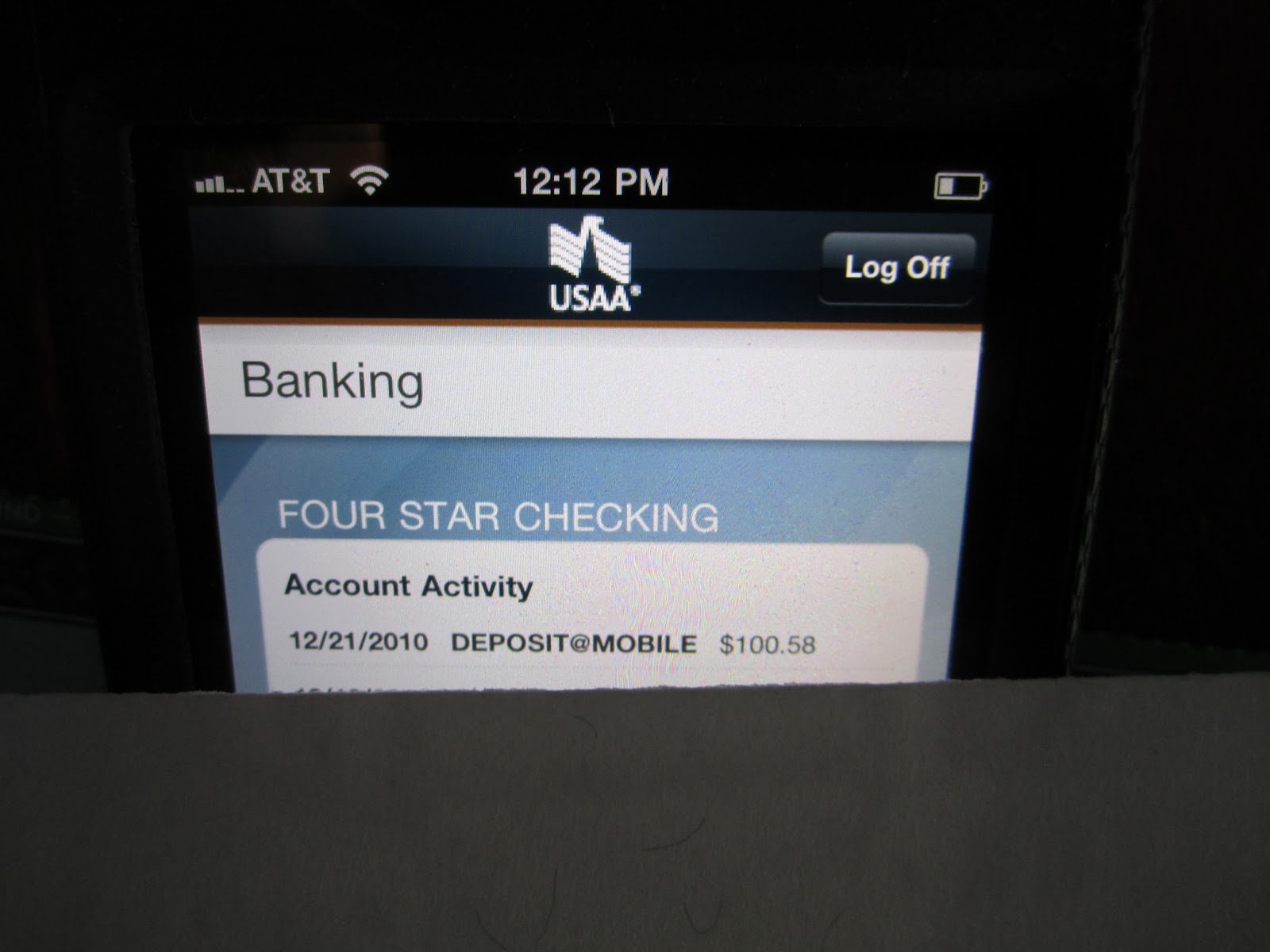
We get our mail sent to us periodically from Alternative Resources in South Dakota. We took delivery a couple of days ago and to our surprise and delight ~ we had a check from Google for $100.58!
Our next challenge was how to deposit this since we no longer have a local bank. I remembered seeing Adam deposit his checks using his iPhone. Our bank - USAA - has an iPhone app. On the back, I signed it, wrote: FOR DEPOSIT ONLY; and listed my account number.
Then, using my new iPhone, I took a picture of the front and the back of the check, and entered the amount: $100.58 when prompted by the iPhone.
The screen indicated the amount was deposited in my USAA checking account. I verified it by logging on and sure enough ~ it was deposited. Sure enough ~ there it was!
Needless to say, I was pretty excited about getting and being able to deposit Google dollars!
Next time you read someone's blog and they have some ads, you might want click on a few and who knows, before too long ~ they may be getting a $100 in the mail! For the hundreds of you that did that for us --- Thank you!!
And thank you for joining us today (on the second edition) of the Roadrunner Chronicles! And thanks to Mary Ann, Mac, George, Kimberly/Jerry, Rick and Rod for leaving comments on my first attempt today...
Merry Christmas to all!
A while back (January of this year in fact) I decided to put Google ads on my blog. I am a regular reader of a couple of blogs that have Google ads and I figured, why not? We'll see where this goes...
I think Nick's Gypsy Journal
and Howard's RV-Dreams Journal
do the ad thing well and I hardly notice it when I am reading their posts.
I tweak around with some things on the Roadrunner Chronicles in an effort to learn and try to learn new things. I logged on to Google Accounts, clicked on 'AdSense' and set up an account.
Then I watched from month to month as my account grew in small increments.
Some months were better than others but once I hit the magic $100.00 mark, Google Inc, was supposed to send me a check. Earlier I tried to set up direct deposit but I couldn't get it done right, so I opted for the 'check in the mail'.
We get our mail sent to us periodically from Alternative Resources in South Dakota. We took delivery a couple of days ago and to our surprise and delight ~ we had a check from Google for $100.58!
Our next challenge was how to deposit this since we no longer have a local bank. I remembered seeing Adam deposit his checks using his iPhone. Our bank - USAA - has an iPhone app. On the back, I signed it, wrote: FOR DEPOSIT ONLY; and listed my account number.
Then, using my new iPhone, I took a picture of the front and the back of the check, and entered the amount: $100.58 when prompted by the iPhone.
The screen indicated the amount was deposited in my USAA checking account. I verified it by logging on and sure enough ~ it was deposited. Sure enough ~ there it was!
Needless to say, I was pretty excited about getting and being able to deposit Google dollars!
Next time you read someone's blog and they have some ads, you might want click on a few and who knows, before too long ~ they may be getting a $100 in the mail! For the hundreds of you that did that for us --- Thank you!!
And thank you for joining us today (on the second edition) of the Roadrunner Chronicles! And thanks to Mary Ann, Mac, George, Kimberly/Jerry, Rick and Rod for leaving comments on my first attempt today...
Merry Christmas to all!
Subscribe to:
Comments (Atom)